Skip to content

Your clients train. You see it all.

K&L Fit puts the week's workouts on your client's phone. They log every weight, attendance tracks itself, and you both chat in the same app, voice messages included.

Free for clients. Trainers start free with 1 client.

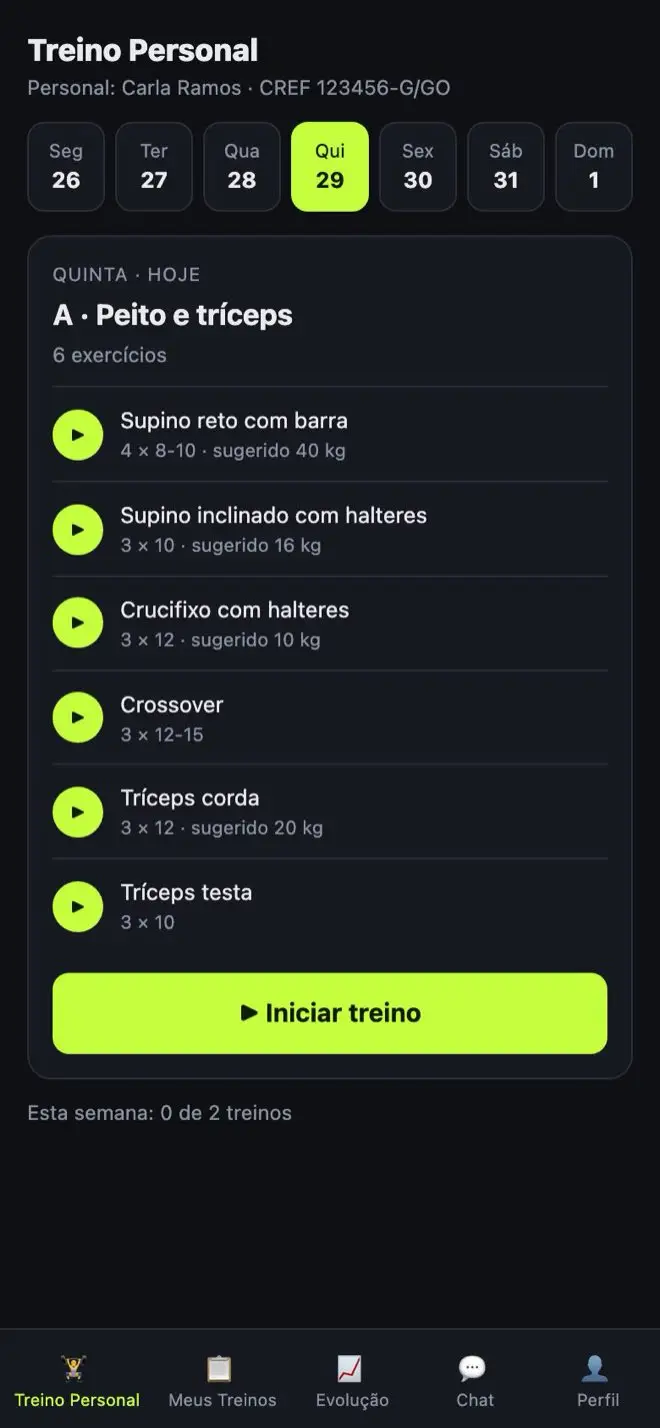
Client screen in K&L Fit with Thursday's workout: chest and triceps, six exercises and the Start workout button
João's week3 of 4 workouts
  1. M
  2. T
  3. W
  4. T
  5. F
  6. S
  7. S

For trainers

  • Build each client's week, or assign one template to several clients at once.
  • See on your dashboard who trained, who missed and who has no workout yet.
  • Track weight progress on every exercise, plus body measurements.
  • Chat by text and voice without mixing it into your personal WhatsApp.
  • Ask the AI for a workout and fine-tune it before saving.
  • With VIP, show up in Find a trainer and hear from new clients.

For clients

  • Today's workout on your phone, with a video for every exercise.
  • Log weight and reps set by set while you train.
  • Next time, the app suggests the weight you used.
  • Training on your own? Plan your week in My Workouts, for free.
  • Looking for a trainer? Search by city, specialty or online, and reach out by chat or WhatsApp.
  • Post your workout on the Timeline, see your friends' and comment.
  • Keep body photos to see your progress. Only you can see them.

Set by set, in the moment

During the workout, your client logs the weight and reps for every set and checks off what's done. The timer runs on its own.

Next time, the weights from the last session are already filled in, and the trainer sees the progress on a chart.

Workout in progress: bench press with 40 and 42.5 kg logged and sets checked off as done

Every client's week on one screen

The dashboard shows each client's days trained, days missed and days still to come. A missed day is counted automatically when a workout day goes by without a workout.

The monthly leaderboard highlights who's most consistent, by attendance, points or weight.

Trainer dashboard with four clients and each one's attendance for the week

Monday to Sunday, with video

Build each day from a library of more than a hundred exercises, each with a short video showing proper form.

Save the week as a template and assign it to several clients at once. Changed the workout? Your client's history stays intact.

A client's weekly workout, split by day, with sets, reps and suggested weight

Voice chat with phone notifications

Trainer and client chat by text or voice messages up to 2 minutes long, separate from WhatsApp.

Even with the app closed, a new message shows up as a notification on the phone.

Chat between trainer Carla and her client João about his bench press weight

Done training? Show your friends.

When you finish a workout, the app asks if you want to post it. The post comes with the summary built in (duration, volume and the weight for each exercise), and you can add up to 4 photos.

Friends like and comment. Each post is for your friends or just for you. Invite your workout buddies with a link on WhatsApp, by email or by name.

Timeline with João Pedro's post: a 52-minute lower-body workout, 13,470 kg of volume, the weight for each exercise, 2 likes and comments from friends

Your progress, photo by photo. Just for you.

In Progress, save body photos with the date and pose, and swipe from one to the next, just like your phone's gallery.

These photos never go to the Timeline, your friends or your trainer. Delete one or all of them whenever you want.

How it works

  1. 1Create your account

    Signing up as a trainer is free and takes a minute.

  2. 2Invite your client

    By email. The invite shows up in the app as soon as they sign in.

  3. 3Build the week

    From scratch, from one of your templates or with help from AI.

  4. 4Follow along

    Attendance, weights, measurements and chat, all in one place.

Plans

Clients never pay. Trainers start free with 1 client and switch to VIP whenever they're ready to coach more people.

Clients & users

Free

Forever. No card needed.

  • Your trainer's workouts on your phone
  • My Workouts, for training on your own
  • Find a trainer by city and specialty
  • Weight logging and progress
  • Chat with your trainer, voice messages included
  • Timeline with friends, likes and comments
  • Progress photos that only you can see
Create a client account

Free for trainers

R$ 0

Get started, no strings attached.

  • 1 active client at a time
  • The rest are paused, nothing gets lost
  • Dashboard, attendance and weight progress
  • Workout templates and AI workouts
Create a trainer account

★ VIP Trainer

R$ 23,99/mo

R$ 287,90 per year

  • Unlimited clients
  • Everything in Free
  • Your profile in Find a trainer, so new clients can find you
  • Cancel anytime, no fees
  • Changed your mind? Full refund within 7 days of your first payment
Get VIP

For now, VIP is available only with cards issued in Brazil. Prices are in Brazilian reais (R$).

Works like an app. No app store.

On iPhone: open klfit.app in Safari, tap Share and then Add to Home Screen.

On Android: open it in Chrome and tap Install app.

K&L Fit opens full screen with its own icon. Turn on notifications in your Profile to know when a message comes in.

FAQ

Do clients pay anything?

No. Clients and regular users use K&L Fit for free, no card needed. Only trainers who want to coach more than 1 client at a time subscribe to VIP.

Do I need to download it from the App Store or Google Play?

No. Open klfit.app on your phone and add it to your Home Screen: K&L Fit opens full screen with its own icon and lets you know when a message comes in.

Does it work if I train without a trainer?

Yes. In My Workouts you plan your week, log your weights and track your progress, all for free.

What happens if a trainer's VIP ends?

Nothing is deleted. Clients are paused, the trainer picks 1 to keep on the Free plan, and everyone comes back when they return to VIP.

Is my data safe?

Your data is handled under Brazil's data protection law (LGPD): you can export or delete your account right in the app, and no one on our team reads the chat between trainer and client. The team panel requires two-step verification and logs every access. The details are on the Security and Privacy Policy pages.

Who sees what I post?

Only your friends on K&L Fit, and only the posts you set to "Friends". A "Only me" post is visible to you alone. Your body photos in Progress are never shown to anyone: not your friends, not your trainer.

How do I add friends?

In Friends, copy your invite link and send it on WhatsApp: whoever opens it becomes your friend. You can also invite by email or search by name. If you'd rather stay private, turn off "Show in search" and only people with your link can find you.

How do I find a trainer in the app?

In Find a trainer, filter by city, specialty and in-person or online sessions. Every trainer lists their professional registration. Chat with them in the app, or on WhatsApp when the trainer shares their number. Rates and hiring are arranged directly with them.

Can I switch trainers?

Yes. When you accept another trainer's invite, the app asks you to confirm and ends the previous connection. Your workout history stays with you.

Start today with your first client.